FreeIPA client enroll — practice, prove, leave
Done: a practice guest joined FreeIPA, proved SSSD and a keytab, then left with no leftover host object.
Requirements
This page joins a throwaway guest, then takes it back out. It does not rebuild the FreeIPA primary.
Hardware
- A disposable practice guest with onboot off.
- An existing FreeIPA primary. See the FreeIPA check guide first.
- Do not use the jump host, a collab guest, or a golden template as the practice target.
OS
- Practice guest: Debian or Ubuntu with
apt. - Jump host with the
ipaCLI, forhost-findandhost-del.
Names — change these
| Placeholder | Change it | Role |
|---|---|---|
practice-guest.example.lab |
Yes | This guest FQDN. Not a live app name |
ipa.example.lab |
Yes | FreeIPA primary |
ipa-ca.example.lab |
Yes | CA alias |
idm.example.lab |
Yes | IPA domain |
IDM.EXAMPLE.LAB |
Yes | Kerberos realm |
dns-path.example.lab |
Yes | Fleet DNS that clients query |
[practice-guest.example.lab] --enroll--> [host principal + keytab + SSSD]
[practice-guest.example.lab] --DNS-----> [dns-path.example.lab] --> [ipa.example.lab named]
DNS
- The practice guest resolves
ipa.example.labthroughdns-path.example.lab. - Fleet DNS owns A, AAAA, SSHFP, and PTR for local names. IPA named is not required to update them.
Ports
| Service | Port | Protocol | Notes |
|---|---|---|---|
| LDAP | 389 | TCP | Practice guest to ipa.example.lab |
| LDAPS | 636 | TCP | Practice guest to ipa.example.lab |
Packages
| Where | Package | Notes |
|---|---|---|
| Practice guest | freeipa-client |
Installed in Step 2. May pull chrony |
| Jump host | ipa CLI |
Already present if you passed the FreeIPA check |
ipa-client-install flags
| Flag | What it does |
|---|---|
--domain=idm.example.lab |
IPA domain. Change it |
--server=ipa.example.lab |
Primary. Change it |
--realm=IDM.EXAMPLE.LAB |
Kerberos realm. Change it |
--hostname=practice-guest.example.lab |
This guest FQDN. Change it |
--principal=admin |
Install principal |
--password=… |
Admin password from /tmp/ipa-admin.pass on this guest |
--mkhomedir |
Create home directories |
--unattended |
No prompts |
--no-ntp |
Skip IPA NTP. Expected here |
--force-join |
Re-join if the host object or leftover client state exists |
Procedure
Step 1 — Set the practice hostname
This step exists because ipa-client-install joins whatever FQDN the guest already has, and a live app name here enrolls that app.
-
SSH to the disposable practice guest. Do not use the jump host, a collab guest, or a golden template. Stay in this shell so
$FQDNremains set. -
Set the practice FQDN. Change the name. Do not use a live app name.
FQDN=practice-guest.example.lab -
Resolve the FreeIPA primary through fleet DNS. You need that A for the optional hosts pin.
dig @dns-path.example.lab ipa.example.lab +shortWorked when you get the current A. Shape:
192.0.2.10 -
Pin
ipa.example.labin/etc/hostsonly when that name is missing. Do not append it on every re-run.IPA_A="$(dig @dns-path.example.lab ipa.example.lab +short | head -1)" if [ -n "$IPA_A" ] && ! grep -qE 'ipa.example.lab' /etc/hosts; then echo "${IPA_A} ipa.example.lab ipa-ca.example.lab" | sudo tee -a /etc/hosts fiWorked when either the pin line prints once, or the command prints nothing because the pin is already there.
192.0.2.10 ipa.example.lab ipa-ca.example.lab -
Set the guest hostname to the practice FQDN.
sudo hostnamectl set-hostname "$FQDN"A successful
hostnamectlprints nothing. -
Read the FQDN back.
hostname -fWorked when:
practice-guest.example.lab
Step 2 — Install the client
This step exists because there is no join without the freeipa-client package, and because that package may pull chrony, which is why Step 3 skips IPA NTP.
-
On the same practice guest, refresh apt.
sudo apt-get updateWorked when the command returns you to the shell with no error.
-
Install the client.
sudo apt-get install -y freeipa-clientWorked when apt finishes without error. Confirm:
dpkg -s freeipa-client | sed -n 's/^Status: //p'install ok installed
Step 3 — Join the realm
This step exists because a package install does not enroll the host, and because the installer reads the admin password from a file on this guest, not from this page.
-
On the practice guest, create the password file with mode 600.
install -m 600 /dev/null /tmp/ipa-admin.passWorked when:
stat -c '%a %n' /tmp/ipa-admin.pass600 /tmp/ipa-admin.pass -
Write only the IPA admin password into that file. One line. The tool asks:
IPA admin password:read -s -p 'IPA admin password: ' IPA_ADMIN_PASS printf '%s' "$IPA_ADMIN_PASS" > /tmp/ipa-admin.pass unset IPA_ADMIN_PASSType the admin password. Press Enter.
read -sdoes not echo it. Do notcatthe file. -
Join the realm. The installer is unattended. It does not prompt. Keep
--no-ntpbecause the client package may have pulled chrony. Keep--force-joinso a leftover host object or client state does not stop the run.sudo ipa-client-install \ --domain=idm.example.lab \ --server=ipa.example.lab \ --realm=IDM.EXAMPLE.LAB \ --hostname="$FQDN" \ --principal=admin \ --password="$(cat /tmp/ipa-admin.pass)" \ --mkhomedir \ --unattended \ --no-ntp \ --force-joinWorked when the last line is:
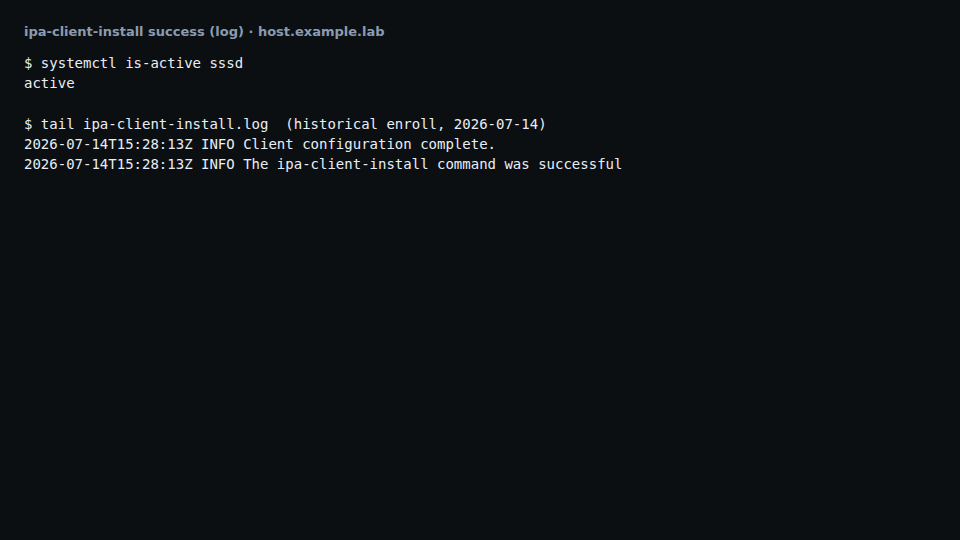
The ipa-client-install command was successfulA line that it could not update DNS SSHFP records is expected while fleet DNS owns local names. Continue.
Could not update DNS SSHFP records
Step 4 — Prove the join
This step exists because a successful installer line does not prove SSSD is running, the keytab is present, or the host object exists in IPA.
-
On the practice guest, read the FQDN.
hostname -fWorked when:
practice-guest.example.lab -
Check SSSD.
systemctl is-active sssdWorked when:
active -
Confirm the host keytab is non-empty.
test -s /etc/krb5.keytab && echo keytab-nonemptyWorked when:
keytab-nonempty -
On the jump host, get a Kerberos ticket if you do not already have one. The guest
$FQDNis not set here, so type the short name.kinit adminThe tool asks:
Password for admin@IDM.EXAMPLE.LAB:Type the admin password. A successful kinit prints nothing.
-
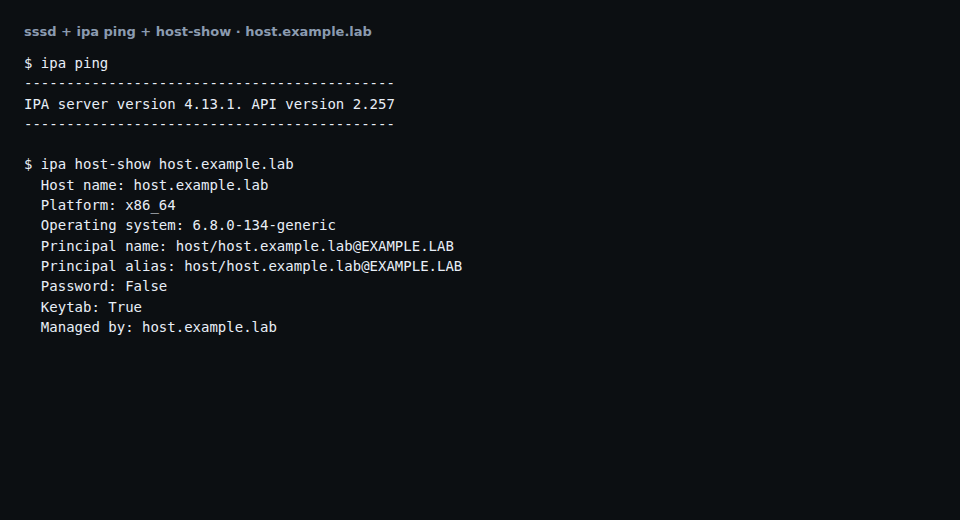
Find the practice host. Expect the object, and Keytab True.
ipa host-find practice-guestWorked when:
--------------
1 host matched
--------------
  Host name: practice-guest.example.lab
  Principal name: host/practice-guest.example.lab@IDM.EXAMPLE.LAB
  Keytab: True
----------------------------
Number of entries returned 1
----------------------------
Step 5 — Leave and delete the host
This step exists because uninstall restarts sshd, does not delete the host object, and often leaves a keytab, so a leftover practice host stays in the realm until you delete it.
-
Open the hypervisor console or the guest agent on the practice guest. Uninstall restarts sshd and can drop an SSH session.
-
Uninstall the client.
-Uis unattended. It does not prompt.sudo ipa-client-install --uninstall -UWorked when the last line is:
The ipa-client-install command was successfulIf the SSH session dropped, that is the sshd restart. Continue from the console.
-
On the jump host, in a shell that still has an admin ticket, delete this practice host only. Change the FQDN if yours differs.
ipa host-del practice-guest.example.lab --continueWorked when:
------------------------ Deleted host "practice-guest.example.lab" ------------------------ -
Confirm the host object is gone.
ipa host-find practice-guestWorked when:
--------------- 0 hosts matched --------------- ---------------------------- Number of entries returned 0 ---------------------------- -
On the practice guest, clear any leftover keytab.
sudo sh -c ':> /etc/krb5.keytab' || sudo rm -f /etc/krb5.keytab
test ! -s /etc/krb5.keytab && echo keytab-cleared
Worked when:
keytab-cleared -
Remove the password file.
shred -u /tmp/ipa-admin.passWorked when the file is gone:
test ! -e /tmp/ipa-admin.pass && echo pass-clearedpass-cleared
An IPA note that no A, AAAA, SSHFP, or PTR was updated is expected. Fleet DNS owns those records. To re-enroll: clear the keytab, open a new SSH session, keep --force-join.
Verification
$ ipa host-find practice-guest
# expect: 0 matches

$ test ! -s /etc/krb5.keytab && echo keytab-cleared
keytab-cleared
ipa-client-install writes /var/log/ipaclient-install.log. If the join fails, that file is the place to look.
Next
Check the FreeIPA primary on a schedule. Then federate it read-only into Keycloak. See the Keycloak lab SSO guide.