FreeIPA lab identity — verify before rebuild
Done: the FreeIPA primary answers on the lab LAN, identity DNS is current, and you did not reinstall it.
Requirements
This page checks a FreeIPA primary that is already up. It does not install one.
Hardware
- An existing FreeIPA primary.
- A jump host that can reach that primary on the lab LAN.
- Optional replica for identity zones only. It is not a public resolver.
OS
- Jump host with
dig,curl, and theipaCLI. - Primary already running FreeIPA (container name
freeipa-serverin this pattern).
Names — change these
| Placeholder | Change it | Role |
|---|---|---|
ipa.example.lab |
Yes | FreeIPA primary, UI, and named for identity zones |
ipa-ca.example.lab |
Yes | CA alias |
ipa2.example.lab |
Yes, if you have a replica | Lab-zone replica |
IDM.EXAMPLE.LAB |
Yes | Kerberos realm |
dns-path.example.lab |
Yes | Fleet DNS that clients query |
DNS
- Clients query
dns-path.example.lab. - That nameserver forwards identity zones to FreeIPA named.
- Public names still use ordinary recursive upstreams. They do not go to IPA.
- The OS name of an enrolled guest points at the guest. Do not point that name at a reverse proxy.
[lab guests] --DNS--> [dns-path.example.lab]
                         |-- identity zones --> [ipa.example.lab named]
                         -- public names -----> [public recursive upstreams]

[apps / SSO broker] --LDAP read-only--> [ipa.example.lab]
[hosts] --enroll--> [host principals + SSSD]
Ports
| Service | Port | Protocol | Notes |
|---|---|---|---|
| Web UI | 443 | TCP | https://ipa.example.lab/ipa/ui/ — lab LAN only |
| LDAP | 389 | TCP | Toward the primary |
| LDAPS | 636 | TCP | Toward the primary |
Packages
| Where | What | Notes |
|---|---|---|
| Jump host | dig, curl, ipa |
Read-only check |
| Primary | FreeIPA already installed | Do not run ipa-server-install from this page |
Procedure
Step 1 — Resolve identity names
This step exists because a retired A still looks like a working primary, and because IPA named must not be the resolver for public names.
-
Open a shell on the jump host. Substitute the names from the table. Stay in this shell for the rest of the page.
-
Resolve the primary through fleet DNS.
dig @dns-path.example.lab ipa.example.lab +shortWorked when you get the current A for
ipa.example.lab. Shape:192.0.2.10Use your live address, not this example, and not a retired one.
-
Resolve the same name from IPA named.
dig @ipa.example.lab ipa.example.lab +shortWorked when the A matches the fleet-DNS answer from the previous sub-step.
-
Resolve a public name through fleet DNS. This proves public recurse still uses ordinary upstreams, not IPA named.
dig @dns-path.example.lab example.com +shortWorked when you get one or more public A records, and they are not the IPA address.
Step 2 — Load the FreeIPA UI
This step exists because a matching DNS A does not prove httpd is serving the directory on the lab LAN.
-
Stay on the lab LAN. Do not hang this UI on a public proxy from this guide.
-
Open this URL in a browser:
https://ipa.example.lab/ipa/ui/Worked when the FreeIPA UI or its login form loads. The login wall is enough. Do not finish a login to pass this page.
-
From the jump host, ask the same URL for its status code.
curl -sk -o /dev/null -w '%{http_code}\n' https://ipa.example.lab/ipa/ui/Worked when:
200
Step 3 — Check services
This step exists because UI 200 can still be true while Directory or the KDC is down. Do not restart services to make the check pass.
-
SSH to
ipa.example.lab. Run the next commands there, not on the jump host. -
Confirm the FreeIPA container is up. If docker denies you, prefix the command with
sudo.docker ps --filter name=freeipa-server --format '{{.Names}} {{.Status}}'Worked when the line starts with
freeipa-server Up. Shape:freeipa-server Up 3 days -
Ask FreeIPA for service status inside the container. If docker denies you, prefix the command with
sudo.docker exec freeipa-server ipactl statusWorked when Directory, KDC, named, httpd, and PKI are RUNNING. Shape:
Directory Service: RUNNING
krb5kdc Service: RUNNING
kadmin Service: RUNNING
named Service: RUNNING
httpd Service: RUNNING
pki-tomcatd Service: RUNNING
ipa: INFO: The ipactl command was successful
Your list may include more services. The ones above must be RUNNING.
Step 4 — Sample the CLI
This step exists because a running container does not prove the IPA API answers, and because this page is a check, not an enroll.
-
On the jump host, get a Kerberos ticket if you do not already have one.
kinit adminThe tool asks:
Password for admin@IDM.EXAMPLE.LAB:Type the admin password. A successful kinit prints nothing and returns you to the shell.
-
Ping the IPA API.
ipa pingWorked when you get a version line. Shape:
---------------------------------------------- IPA server version 4.11.0. API version 2.253 ---------------------------------------------- -
Sample a few host objects. Do not enroll a host from this page.
ipa host-find --sizelimit=5Worked when a small sample of lab hosts prints. Shape:
---------------
5 hosts matched
---------------
  Host name: ipa.example.lab
  Principal name: host/ipa.example.lab@IDM.EXAMPLE.LAB
  ...
----------------------------
Number of entries returned 5
----------------------------
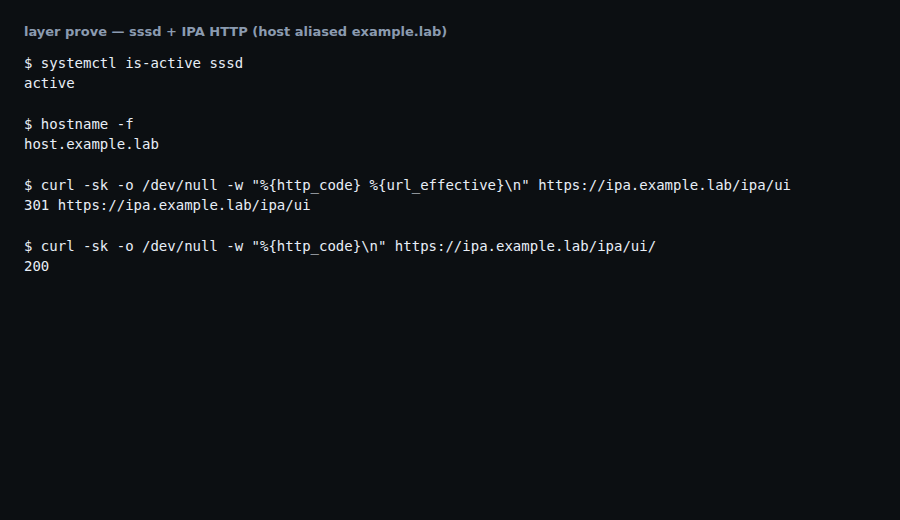
Verification
$ dig @dns-path.example.lab ipa.example.lab +short
# expect: current A for ipa.example.lab — not a retired name

$ curl -sk -o /dev/null -w '%{http_code}\n' https://ipa.example.lab/ipa/ui/
200

$ ipa ping
# expect: a version line

$ ipa host-find --sizelimit=5
# expect: a small sample of lab hosts
If you have ipa2.example.lab, it answers lab zones and does not usefully recurse the public internet.
This check writes no install log.
Next
Join a throwaway guest, prove SSSD and a keytab, then take it back out. See the FreeIPA client enroll guide.